Hello, traders! 😊
Welcome to TetherMate, your trusted futures trading fee cashback service!
If you're reading this, you probably already have a Bybit account.
Give us just three minutes, and we'll show you how to get back some of the trading fees you've been paying!
On top of the standard trading fee discount, TetherMate gives you 30% cashback on your trading fees! 😊
Don't miss out! Trading fees come directly out of your trading capital, so why not get some of that money back?
We highly recommend taking advantage of our cashback service.
Bybit makes things easier with its KYC Transfer feature.
We recommend using the Bybit mobile app for a smoother experience.
First, click the link below to create your new cashback account.
Once you've created your new Bybit account through TetherMate,
you'll need to transfer your identity verification (KYC) from your existing account.
Don't worry! The process is quick and straightforward. Just follow the steps below.
How to Transfer Your KYC Verification
| Please temporarily move your funds out of your existing Bybit account as a precaution. Make sure you've downloaded the Bybit mobile app. |
Step 1. Open the Bybit app and log in to your existing account.
Step 2. Tap the profile icon in the top-left corner. On the next screen, tap your profile icon or profile information again.
Step 3. Select Identity Verification, then tap the three dots (···) next to Update. Choose Transfer Identity Verification.
Step 4. You'll need to complete facial verification before transferring your KYC. Tap Facial Verification and follow the on-screen instructions.
Step 5. Once facial verification is complete, agree to the condition stating that KYC transfers are allowed only once every 180 days.
Step 6. Enter the email address or phone number associated with the new Bybit account you created through TetherMate.
Step 7. Enter the verification code sent to your new account.
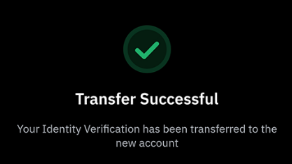
Once you've completed these steps and see the confirmation screen shown in the image below, your KYC transfer is complete!
You're almost done! 🎉
Now, simply sign up on the TetherMate website to complete the final step.
That's it! You're all set.
Thank you for choosing TetherMate!